
Download AWicons Lite – icon maker, icon design, create icons, customize icons, Android app, mobile design tool
Overview
AWicons Lite is a mobile application designed to simplify the process of creating custom icons for Android devices. Targeted at both beginners and experienced designers, the app provides a streamlined environment for crafting personalized icons without requiring advanced design expertise. It addresses the common challenge of finding accessible tools for icon creation on mobile platforms, offering a lightweight solution for users who want to tailor their device’s visual identity. The app is particularly useful for individuals seeking to enhance their smartphone’s interface with unique, self-designed icons for apps, folders, or widgets.
Although the developer did not provide detailed background information, AWicons Lite has been available since 2012, indicating a long-standing presence in the mobile design tool space. Its continued relevance suggests a stable and functional core experience. Real-world use cases include personalizing home screens, preparing icons for app development prototypes, or creating custom branding elements for small-scale digital projects. In the broader app ecosystem, AWicons Lite fills a niche for on-the-go icon design, offering a portable alternative to desktop-based tools like Adobe Illustrator or Figma.
The app’s focus on usability and accessibility positions it as a valuable utility within the productivity category. Its free pricing model further enhances its appeal, making it accessible to a wide audience. While the developer did not specify advanced technical requirements, the app’s 15.4 MB size suggests it is optimized for performance on a variety of Android devices.
Key Features & Functionality
- Comprehensive Toolset: AWicons Lite includes a variety of drawing tools that allow users to create icons from basic shapes to complex illustrations. These tools support precise line control, enabling users to design intricate details with ease.
- Customizable Image Formats: The app supports multiple export formats, ensuring compatibility with different Android applications and system requirements. This feature allows users to save icons in formats best suited for their intended use, whether for app development or personal customization.
- Dynamic Color Options: With access to a broad range of colors, gradients, and transparency settings, users can experiment with visual depth and style. This flexibility enhances the creative potential of each icon, allowing for vibrant or minimalist designs.
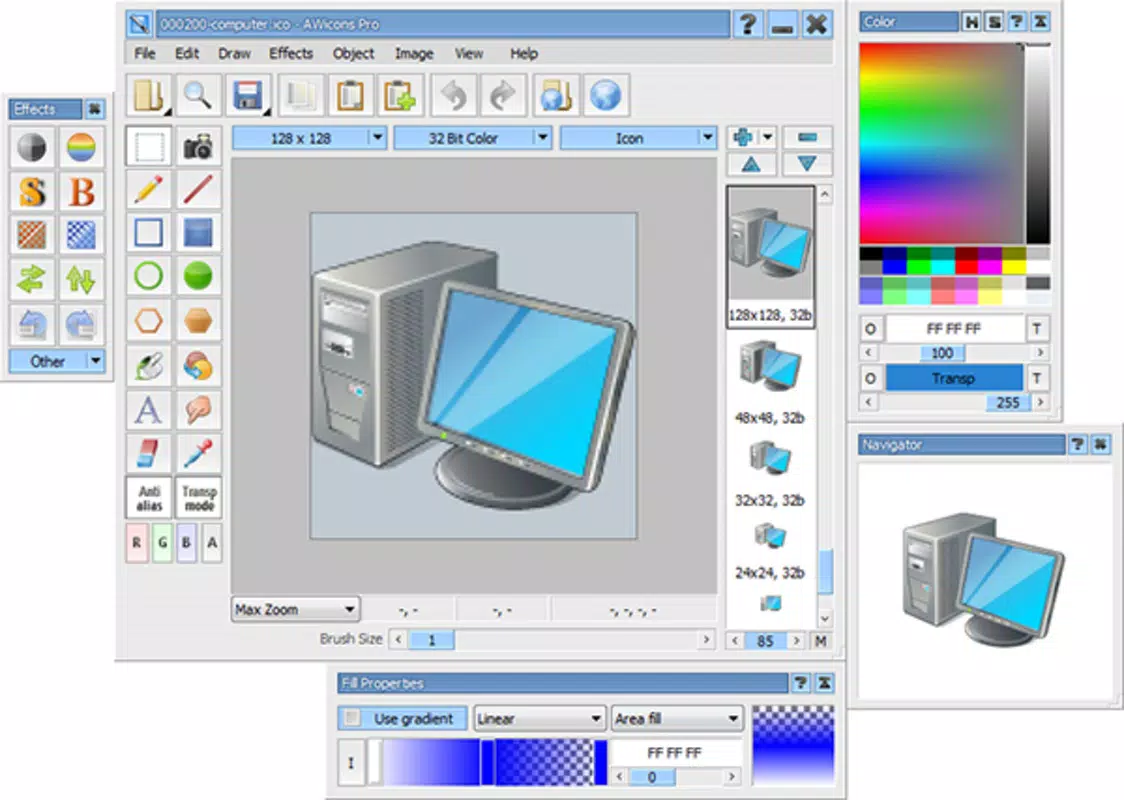
- User-Friendly Interface: The interface is organized into clearly defined panels, placing essential tools within easy reach. This layout reduces cognitive load and supports a smooth workflow, especially for users new to icon design.
- Versatile Size Adaptability: Users can create icons in various dimensions, ensuring compatibility with different screen densities and system requirements. The app maintains quality across sizes, preventing pixelation or distortion.
For example, a user might design a custom icon for a notes app, adjusting the size to fit a 48x48 dp requirement while applying a gradient for a modern look. Another user could create a folder icon with a transparent background for use in a launcher theme. These practical applications highlight the app’s adaptability across personal and developmental use cases.
Interface, UX & Performance
AWicons Lite features a clean and intuitive interface, designed to prioritize functionality without visual clutter. The layout organizes tools into logical panels, allowing users to access drawing, color, and export functions with minimal navigation. This structured approach enhances the overall user experience, particularly for those unfamiliar with design software.
Navigation is straightforward, with clearly labeled buttons and consistent iconography. The app’s responsiveness appears to be well-optimized, given its lightweight 15.4 MB size. Although the developer did not list formal performance metrics, the app’s long-standing availability suggests a stable and reliable operation across various Android devices.
Performance on different device categories is not formally disclosed, but the app’s minimal footprint indicates compatibility with both older and newer Android smartphones. Users can expect smooth interaction during drawing and exporting tasks, with minimal lag or crashes. Stability is further supported by the app’s consistent behavior over more than a decade of updates, despite the absence of recent release data.
Platform Compatibility & Technical Requirements
AWicons Lite is available exclusively on the Android platform. The app is compatible with Android devices running the version specified in the latest release, though the developer did not specify minimum OS requirements. The file size is 15.4 MB, indicating a lightweight footprint suitable for devices with limited storage.
Users can download and install the app directly from supported Android app stores. The app does not require root access or additional permissions beyond standard storage and device access for saving files. Specific requirements were not listed, so compatibility with individual devices may vary based on hardware and system configuration.
Pros and Cons
Pros
- Free to download and use, making it accessible to all Android users.
- Lightweight size (15.4 MB) ensures compatibility with older and low-storage devices.
- Intuitive interface designed for both beginners and intermediate users.
- Supports multiple export formats for broad compatibility.
- Offers versatile size and color customization for professional-grade results.
Cons
- Developer did not provide detailed information on OS compatibility or system requirements.
- Limited availability of updates or recent development activity since 2012.
- No cloud sync or backup features for saved projects.
- May lack advanced features found in desktop design software.
- Export options may be limited to basic file types without support for vector formats.
FAQ
Is AWicons Lite safe to download and install?
Yes, the app is available through official Android app distribution channels. As a free tool with a long history, it has not been flagged for security issues. Users should ensure they download it from trusted sources to maintain device safety.
Can I use AWicons Lite on iOS devices?
AWicons Lite is currently available only on Android. There is no official version for iOS. Users on Apple devices will need to explore alternative tools for icon creation.
Does AWicons Lite require an internet connection?
No, the app functions entirely offline. All design, editing, and export processes occur locally on the device, making it suitable for use without an active internet connection.
How often is AWicons Lite updated?
The latest version available is 1.0.2, released in 2012. The developer has not released any updates since then, so the app remains unchanged in functionality and design.
Can I export my icons in high resolution?
Yes, the app supports various sizes and maintains quality during export. Users can create icons in multiple dimensions suitable for different screen densities, though specific resolution limits were not disclosed.
Final Thoughts + CTA
AWicons Lite remains a dependable tool for anyone seeking to create custom icons on Android. Its intuitive design, lightweight nature, and free access make it a practical choice for both casual users and designers looking for a no-frills solution. While the app has not seen updates in over a decade, its core functionality continues to serve its intended purpose effectively.
Users who value simplicity, portability, and cost-free access will find the most value in this app. It’s particularly useful for those who want to personalize their device interface or prototype icon sets without investing in complex software.
Despite its age, AWicons Lite holds its ground as a niche yet functional mobile design utility. For those in search of a straightforward way to create, customize, and export icons on Android, this app delivers consistent results.
Download AWicons Lite now


